Make your first sync link
A sync link lets your viewers watch your full reaction next to their own copy of the show, lined up for them. They open it and press play once: when you pause to talk, the episode waits for you. Making one takes about 10 minutes for a watch-along, and about the length of the reaction if you pause the show to talk.
Add to ChromeWhat you need
- Chrome (or another Chromium browser) on a computer.
- Your full reaction on a YouTube watch page, Vimeo, Google Drive, or your Patreon post with Patreon's own video player.
- The episode or film on Netflix, Prime Video (primevideo.com), JioHotstar or Crunchyroll.
Make it, step by step
- Add ReactionSync and sign in. Add it to Chrome, pin its icon from the puzzle-piece menu, click it and sign in with Google. When Google's window closes, click the icon again.
- Open both videos side by side and press play on both. Put your reaction and the episode in two windows, left and right. A tab only shows up in ReactionSync once its video is playing on screen. Reload any tab that was open before you installed.
- Start a new session. Click the icon in one of those two windows. Choose the show under 1. Source and your reaction under 2. Reaction, click Continue, then Start New Session.
- Line them up once. Pause both on the same moment, for example where you press play on the episode in your reaction, and click 🎬 Synced. You can also click ✏️ on that row and type the two times exactly. To keep your intro before the episode starts, first add ⏸ Source Paused at 0:00 on both.
- Link the tabs and mark as you go. Flip the switch to Tabs Linked and let them play. Where you paused the show to talk, click ⏸ Source Paused when you stop it and 🎬 Synced when it plays again. Where you skipped part of the episode, click ⏸ Reaction Paused, move the show, then 🎬 Synced. Click 🏁 End at the end. A watch-along that never pauses the show needs only the one Synced point and the End.
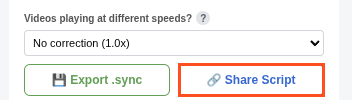
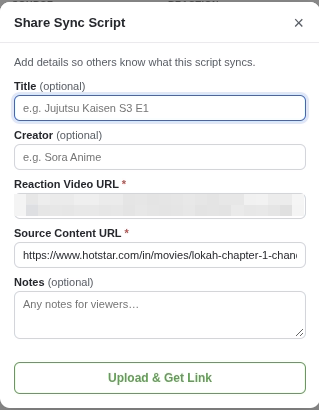
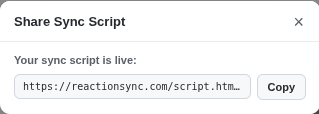
- Share it. Click 🔗 Share Script, add a title and your name, click Upload & Get Link, then Copy. Nothing saves on its own, so on a long reaction click 💾 Export .sync every 10 to 15 minutes.
Post it where your viewers are
Put the link in the post where that reaction lives, with a line in your own words: your Patreon post, the video's description or a pinned comment, or your Discord. For example:
Watch this in sync with your own Netflix: <your link>. It keeps our full reaction lined up with the episode, even when we pause to talk.
Use your Patreon post's address as the reaction, never the video file's own address: the link's page shows both addresses to anyone who has it.
Doing a whole run? In the extension, open your avatar menu and choose My Shared Scripts. On that page, open Groups and make a group: one link for every episode, which stays the same as you add more.
Want help with your first one?
Reply to our email, or write to support@reactionsync.com. We'll get on a short call and you make your first link while we walk you through it.